As a full-stack developer you might want to deploy your containers on Google Cloud Run instead of managing a full-blown Kubernetes cluster with knative on top of it. However please note that Google Cloud Run is currently still in beta so your experience may vary.
Yesterday I saw increased build failure related to a soon-to-be-merge branch from a co-worker, the CI gcloud run deploy command yields:
After a deep dive into the code changes I found that some new code was delaying for up to 12 seconds the app socket listening step. Worst, those 12 seconds delay was a measure I took on my MacBook and this new code was highly Disk I/O bound so it explained why Cloud Run readiness probe timed out.
The fix was then to remove this delay and load what was needed from the filesystem on-demand (instead of loading everything — with a lot of never-used stuff — somewhere in the app life-cycle). I hope this post will help someone because I've found nothing on the web on that matter :) !
Kubernetes events stream with kubectl get events --all-namespaces --watch are very hard to read, unless you got a very very (very) large screen.
NAMESPACE      LAST SEEN                        FIRST SEEN                       COUNT     NAME                                                        KIND                      SUBOBJECT                              TYPE      REASON                  SOURCE                                                         MESSAGE
image-charts   2018-05-03 20:36:08 +0200 CEST   2018-05-03 20:36:08 +0200 CEST   1         image-charts-deployment-57575d876f-5vjvj.152b364506573f50   Pod                                                              Normal    Scheduled               default-scheduler                                              Successfully assigned image-charts-deployment-57575d876f-5vjvj to gke-image-charts-us-w-production-pool-09fa8042-gmcd
image-charts   2018-05-03 20:36:09 +0200 CEST   2018-05-03 20:36:09 +0200 CEST   1         image-charts-deployment-57575d876f-5vjvj.152b36451cb11f32   Pod                                                              Normal    SuccessfulMountVolume   kubelet, gke-image-charts-us-w-production-pool-09fa8042-gmcd   MountVolume.SetUp succeeded for volume "default-token-psj7t"
image-charts   2018-05-03 20:36:11 +0200 CEST   2018-05-03 20:36:11 +0200 CEST   1         image-charts-deployment-57575d876f-5vjvj.152b3645963079f5   Pod                       spec.containers{image-charts-runner}   Normal    Pulled                  kubelet, gke-image-charts-us-w-production-pool-09fa8042-gmcd   Container image "eu.gcr.io/ic-18/image-charts:master-ef08ceeaf315c89f7e7dd4bc4cec8f9b0cef834a" already present on machine
image-charts   2018-05-03 20:36:11 +0200 CEST   2018-05-03 20:36:11 +0200 CEST   1         image-charts-deployment-57575d876f-5vjvj.152b364599f0352e   Pod                       spec.containers{image-charts-runner}   Normal    Created                 kubelet, gke-image-charts-us-w-production-pool-09fa8042-gmcd   Created container
image-charts   2018-05-03 20:36:12 +0200 CEST   2018-05-03 20:36:12 +0200 CEST   1         image-charts-deployment-57575d876f-5vjvj.152b3645c253b80f   Pod                       spec.containers{image-charts-runner}   Normal    Started                 kubelet, gke-image-charts-us-w-production-pool-09fa8042-gmcd   Started container
image-charts   2018-05-03 20:42:08 +0200 CEST   2018-05-03 20:42:08 +0200 CEST   1         image-charts-deployment-57575d876f-5vjvj.152b3698d837ff3c   Pod                       spec.containers{image-charts-runner}   Normal    Killing                 kubelet, gke-image-charts-us-w-production-pool-09fa8042-gmcd   Killing container with id docker://image-charts-runner:Need to kill Pod
image-charts   2018-05-03 20:20:38 +0200 CEST   2018-05-03 20:20:38 +0200 CEST   1         image-charts-deployment-57575d876f-v74c8.152b356c77a29f53   Pod                                                              Normal    Scheduled               default-scheduler                                              Successfully assigned image-charts-deployment-57575d876f-v74c8 to gke-image-charts-us-w-production-pool-09fa8042-gmcd
image-charts   2018-05-03 20:20:39 +0200 CEST   2018-05-03 20:20:39 +0200 CEST   1         image-charts-deployment-57575d876f-v74c8.152b356c88794874   Pod                                                              Normal    SuccessfulMountVolume   kubelet, gke-image-charts-us-w-production-pool-09fa8042-gmcd   MountVolume.SetUp succeeded for volume "default-token-psj7t"
image-charts   2018-05-03 20:20:40 +0200 CEST   2018-05-03 20:20:40 +0200 CEST   1         image-charts-deployment-57575d876f-v74c8.152b356ce43ac4e3   Pod                       spec.containers{image-charts-runner}   Normal    Pulled                  kubelet, gke-image-charts-us-w-production-pool-09fa8042-gmcd   Container image "eu.gcr.io/ic-18/image-charts:master-ef08ceeaf315c89f7e7dd4bc4cec8f9b0cef834a" already present on machine
image-charts   2018-05-03 20:20:40 +0200 CEST   2018-05-03 20:20:40 +0200 CEST   1         image-charts-deployment-57575d876f-v74c8.152b356ceadd2e40   Pod                       spec.containers{image-charts-runner}   Normal    Created                 kubelet, gke-image-charts-us-w-production-pool-09fa8042-gmcd   Created container
image-charts   2018-05-03 20:20:41 +0200 CEST   2018-05-03 20:20:41 +0200 CEST   1         image-charts-deployment-57575d876f-v74c8.152b356d1403821b   Pod                       spec.containers{image-charts-runner}   Normal    Started                 kubelet, gke-image-charts-us-w-production-pool-09fa8042-gmcd   Started container
image-charts   2018-05-03 20:26:09 +0200 CEST   2018-05-03 20:26:09 +0200 CEST   1         image-charts-deployment-57575d876f-v74c8.152b35b95bfa97e4   Pod                       spec.containers{image-charts-runner}   Normal    Killing                 kubelet, gke-image-charts-us-w-production-pool-09fa8042-gmcd   Killing container with id docker://image-charts-runner:Need to kill Pod
image-charts   2018-05-03 20:20:38 +0200 CEST   2018-05-03 20:20:38 +0200 CEST   1         image-charts-deployment-57575d876f.152b356c778b2a36         ReplicaSet                                                       Normal    SuccessfulCreate        replicaset-controller                                          Created pod: image-charts-deployment-57575d876f-v74c8
image-charts   2018-05-03 20:26:08 +0200 CEST   2018-05-03 20:26:08 +0200 CEST   1         image-charts-deployment-57575d876f.152b35b94cd06d75         ReplicaSet                                                       Normal    SuccessfulDelete        replicaset-controller                                          Deleted pod: image-charts-deployment-57575d876f-v74c8
image-charts   2018-05-03 20:36:08 +0200 CEST   2018-05-03 20:36:08 +0200 CEST   1         image-charts-deployment-57575d876f.152b364505f8a022         ReplicaSet                                                       Normal    SuccessfulCreate        replicaset-controller                                          Created pod: image-charts-deployment-57575d876f-5vjvj
image-charts   2018-05-03 20:42:08 +0200 CEST   2018-05-03 20:42:08 +0200 CEST   1         image-charts-deployment-57575d876f.152b3698d19cba5f         ReplicaSet                                                       Normal    SuccessfulDelete        replicaset-controller                                          Deleted pod: image-charts-deployment-57575d876f-5vjvj
image-charts   2018-05-03 20:42:08 +0200 CEST   2018-05-03 12:27:10 +0200 CEST   21        image-charts-deployment.152b1b9630769766                    Deployment                                                       Normal    ScalingReplicaSet       deployment-controller                                          Scaled down replica set image-charts-deployment-57575d876f to 3
image-charts   2018-05-03 20:36:08 +0200 CEST   2018-05-03 12:47:08 +0200 CEST   20        image-charts-deployment.152b1cad1828a4bc                    Deployment                                                       Normal    ScalingReplicaSet       deployment-controller                                          Scaled up replica set image-charts-deployment-57575d876f to 4
image-charts   2018-05-03 20:36:08 +0200 CEST   2018-04-23 22:32:29 +0200 CEST   205       image-charts-hpa.15282ad08af5393c                           HorizontalPodAutoscaler                                          Normal    SuccessfulRescale       horizontal-pod-autoscaler                                      New size: 4; reason: cpu resource utilization (percentage of request) above target
image-charts   2018-05-03 20:42:08 +0200 CEST   2018-04-23 22:38:29 +0200 CEST   205       image-charts-hpa.15282b2472554668                           HorizontalPodAutoscaler                                          Normal    SuccessfulRescale       horizontal-pod-autoscaler                                      New size: 3; reason: All metrics below target
Let's specify a go-template and improve this:
kubectl get events --all-namespaces --watch -o 'go-template={{.lastTimestamp}} {{.involvedObject.kind}} {{.message}} ({{.involvedObject.name}}){{"\n"}}'

2018-05-03T18:36:08Z Pod Successfully assigned image-charts-deployment-57575d876f-5vjvj to gke-image-charts-us-w-production-pool-09fa8042-gmcd (image-charts-deployment-57575d876f-5vjvj)
2018-05-03T18:36:09Z Pod MountVolume.SetUp succeeded for volume "default-token-psj7t"  (image-charts-deployment-57575d876f-5vjvj)
2018-05-03T18:36:11Z Pod Container image "eu.gcr.io/killbug-165718/image-charts:master-ef08ceeaf315c89f7e7dd4bc4cec8f9b0cef834a" already present on machine (image-charts-deployment-57575d876f-5vjvj)
2018-05-03T18:36:11Z Pod Created container (image-charts-deployment-57575d876f-5vjvj)
2018-05-03T18:36:12Z Pod Started container (image-charts-deployment-57575d876f-5vjvj)
2018-05-03T18:42:08Z Pod Killing container with id docker://image-charts-runner:Need to kill Pod (image-charts-deployment-57575d876f-5vjvj)
2018-05-03T18:20:38Z Pod Successfully assigned image-charts-deployment-57575d876f-v74c8 to gke-image-charts-us-w-production-pool-09fa8042-gmcd (image-charts-deployment-57575d876f-v74c8)
2018-05-03T18:20:39Z Pod MountVolume.SetUp succeeded for volume "default-token-psj7t"  (image-charts-deployment-57575d876f-v74c8)
2018-05-03T18:20:40Z Pod Container image "eu.gcr.io/killbug-165718/image-charts:master-ef08ceeaf315c89f7e7dd4bc4cec8f9b0cef834a" already present on machine (image-charts-deployment-57575d876f-v74c8)
2018-05-03T18:20:40Z Pod Created container (image-charts-deployment-57575d876f-v74c8)
2018-05-03T18:20:41Z Pod Started container (image-charts-deployment-57575d876f-v74c8)
2018-05-03T18:26:09Z Pod Killing container with id docker://image-charts-runner:Need to kill Pod (image-charts-deployment-57575d876f-v74c8)
2018-05-03T18:20:38Z ReplicaSet Created pod: image-charts-deployment-57575d876f-v74c8 (image-charts-deployment-57575d876f)
2018-05-03T18:26:08Z ReplicaSet Deleted pod: image-charts-deployment-57575d876f-v74c8 (image-charts-deployment-57575d876f)
2018-05-03T18:36:08Z ReplicaSet Created pod: image-charts-deployment-57575d876f-5vjvj (image-charts-deployment-57575d876f)
2018-05-03T18:42:08Z ReplicaSet Deleted pod: image-charts-deployment-57575d876f-5vjvj (image-charts-deployment-57575d876f)
2018-05-03T18:42:08Z Deployment Scaled down replica set image-charts-deployment-57575d876f to 3 (image-charts-deployment)
2018-05-03T18:36:08Z Deployment Scaled up replica set image-charts-deployment-57575d876f to 4 (image-charts-deployment)
2018-05-03T18:36:08Z HorizontalPodAutoscaler New size: 4; reason: cpu resource utilization (percentage of request) above target (image-charts-hpa)
2018-05-03T18:42:08Z HorizontalPodAutoscaler New size: 3; reason: All metrics below target (image-charts-hpa)
Much better right?
Last thing, we do not want to remember this so let's define a function in ~/.zshrc (or equivalent):
Who doesn't want to spread one of its SaaS across continents? I finally had the opportunity to do it for my Image-Charts SaaS!
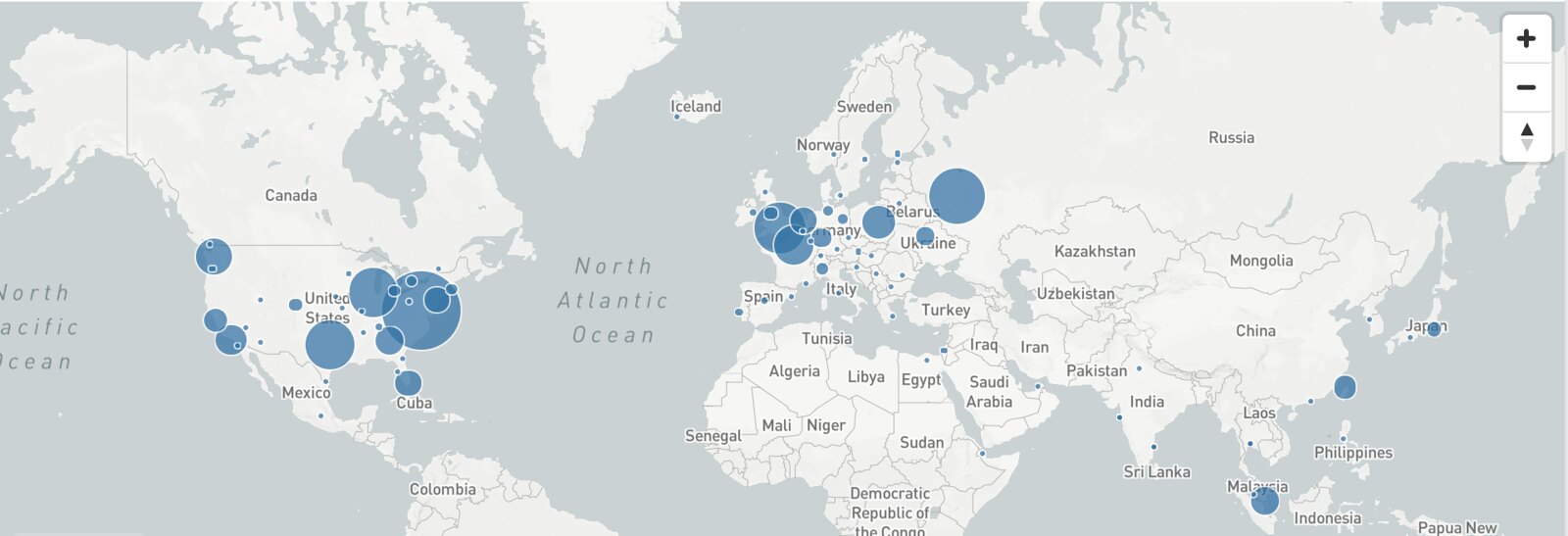
Image-charts was at first hosted on a Kubernetes cluster in europe-west Google Cloud Engine region and it was kind of an issue considering where our real users where (screenshot courtesy of Cloudflare DNS traffic):
As we can see, an important part of our traffic come from the US zone. Good news, it was time to try multi-region kubernetes. Here is a step by step guide on how to do it.
New Kubernetes cluster region on GCE
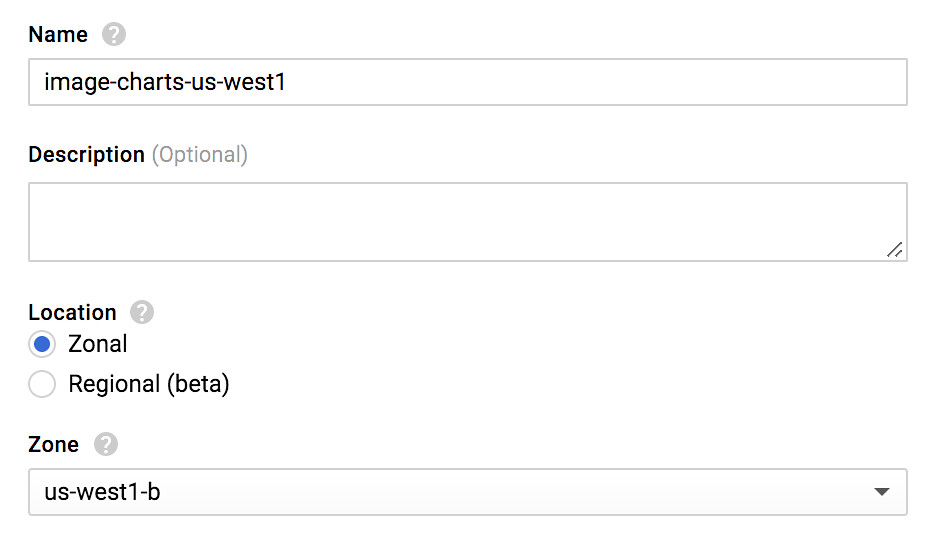
First thing first, let's create a new kubernetes cluster in us-west coast:
You should really (really) enable the preemptible nodes feature. Why? Because you get chaos engineering for free and continuously test your application architecture and configuration for robustness! Preemptible VM means that cluster nodes won't last more than 24 hours and good news : I observed cluster cost reduction by two.
Get a static IP from GCE
Next we need to create a new IP address on GCE. We will associate this IP to our kubernetes service so it will always stay with a static IP.
gcloud compute addresses list
NAME                       REGION        ADDRESS         STATUS
image-charts-europe-west1  europe-west1  35.180.80.101   RESERVED
image-charts-us-west1      us-west1      35.180.80.100   RESERVED
Kubernetes YAML
The above app YAML defines multiple Kubernetes objects: a namespace (app-ns), a service that will give access to our app from outside (my-app-service), our app deployment object (my-app-deployment), auto-scaling through horizontal pod autoscaler and finally a pod disruption budget for our app.
# deploy/k8s.yaml
apiVersion: v1
kind: Namespace
metadata:
  name: app-ns
---
apiVersion: v1
kind: Service
metadata:
  labels:
    app: my-app
    zone: __ZONE__
  name: my-app-service
  namespace: app-ns
spec:
  type: NodePort
  ports:
  - name: "80"
    port: 80
    targetPort: 8080
    protocol: TCP
  selector:
    app: my-app
  type: LoadBalancer
  loadBalancerIP: __IP__
---
apiVersion: extensions/v1beta1
kind: Deployment
metadata:
  namespace: app-ns
  name: my-app-deployment
  labels:
    app: my-app
spec:
  replicas: 3
  # how much revision history of this deployment you want to keep
  revisionHistoryLimit: 2
  strategy:
    type: RollingUpdate
    rollingUpdate:
      # specifies the maximum number of Pods that can be unavailable during the update
      maxUnavailable: 25%
      # specifies the maximum number of Pods that can be created above the desired number of Pods
      maxSurge: 200%
  template:
    metadata:
      labels:
        app: my-app
    spec:
      affinity:
        podAntiAffinity:
          preferredDuringSchedulingIgnoredDuringExecution:
          - weight: 100
            podAffinityTerm:
              topologyKey: "kubernetes.io/hostname"
              labelSelector:
                matchExpressions:
                - key: app
                  operator: In
                  values:
                  - my-app
      restartPolicy: Always
      containers:
      - image: __IMAGE__
        name: my-app-runner
        resources:
          requests:
            memory: "100Mi"
            cpu: "1"
          limits:
            memory: "380Mi"
            cpu: "2"
        # send traffic when:
        readinessProbe:
          httpGet:
            path: /_ready
            port: 8081
          initialDelaySeconds: 20
          timeoutSeconds: 4
          periodSeconds: 5
          failureThreshold: 1
          successThreshold: 2
        # restart container when:
        livenessProbe:
          httpGet:
            path: /healthz
            port: 8081
          initialDelaySeconds: 20
          timeoutSeconds: 2
          periodSeconds: 2
          # if we just started the pod, we need to be sure it works
          # so it may take some time and we don't want to rush things up (thx to rolling update)
          failureThreshold: 5
          successThreshold: 1
        ports:
        - name: containerport
          containerPort: 8080
        - name: monitoring
          containerPort: 8081
---
apiVersion: autoscaling/v1
kind: HorizontalPodAutoscaler
metadata:
  name: my-app-hpa
  namespace: app-ns
spec:
  scaleTargetRef:
    apiVersion: extensions/v1beta1
    kind: Deployment
    name: my-app-deployment
  minReplicas: 3
  maxReplicas: 5
  targetCPUUtilizationPercentage: 200
---
apiVersion: policy/v1beta1
kind: PodDisruptionBudget
metadata:
  name: my-app-pdb
  namespace: app-ns
spec:
  minAvailable: 2
  selector:
    matchLabels:
      app: my-app
Some things of note:
__IMAGE__, __IP__ and __ZONE__ will be replaced during the gitlab-ci deploy stage (see continuous delivery pipeline section).
  kind: Service
  # [...]
  type: LoadBalancer
  loadBalancerIP: __IP__
type: LoadBalancer and loadBalancerIP tell kubernetes to creates a TCP Network Load Balancer (the IP must be a regional one, just as we did).
It's always a good practice to split up monitoring and production traffic that's why monitoring is on port 8081 (for liveness and readiness probes) and production traffic on port 8080.
Another good practice is to setup podAntiAffinity to tell kubernetes scheduler to place our app pod replica between available nodes and not put all our app pods on the same node.
And the good news is: this principle can be easily applied in Kubernetes thanks to requests and limits.
Finally we use PodDisruptionBudget policy to tell Kubernetes scheduler how to react when disruptions occurs (e.g. one of our preemptible node dies).
Continuous Delivery Pipeline
I used Gitlab-CI here because that's what power Image-charts & Redsmin deployments but it will work with other alternatives as well.
# gitlab.yaml

# https://docs.gitlab.com/ce/ci/yaml/
image: docker

# fetch is faster as it re-uses the project workspace (falling back to clone if it doesn't exist).
variables:
  GIT_STRATEGY: fetch
  # We use overlay for performance reasons
  # https://docs.gitlab.com/ce/ci/docker/using_docker_build.html#using-the-overlayfs-driver
  DOCKER_DRIVER: overlay

services:
  - docker:dind

stages:
  - build
  - test
  - deploy

# template that we can reuse
.before_script_template: &setup_gcloud
  image: lakoo/node-gcloud-docker:latest
  retry: 2
  variables:
    # default variables
    ZONE: us-west1-b
    CLUSTER_NAME: image-charts-us-west1
  only:
    # only
    - /master/
  before_script:
    - echo "Setting up gcloud..."
    - echo $GCLOUD_SERVICE_ACCOUNT | base64 -d > /tmp/$CI_PIPELINE_ID.json
    - gcloud auth activate-service-account --key-file /tmp/$CI_PIPELINE_ID.json
    - gcloud config set compute/zone $ZONE
    - gcloud config set project $GCLOUD_PROJECT
    - gcloud config set container/use_client_certificate False
    - gcloud container clusters get-credentials $CLUSTER_NAME
    - gcloud auth configure-docker --quiet
  after_script:
    - rm -f /tmp/$CI_PIPELINE_ID.json

build:
  <<: *setup_gcloud
  stage: build
  retry: 2
  script:
    - docker build --rm -t ${DOCKER_REGISTRY}/${PACKAGE_NAME}:${CI_COMMIT_REF_NAME}-${CI_COMMIT_SHA} .
    - mkdir release
    - docker push ${DOCKER_REGISTRY}/${PACKAGE_NAME}:${CI_COMMIT_REF_NAME}-${CI_COMMIT_SHA}

test:
  <<: *setup_gcloud
  stage: test
  coverage: '/Lines[^:]+\:\s+(\d+\.\d+)\%/'
  retry: 2
  artifacts:
    untracked: true
    expire_in: 1 week
    name: "coverage-${CI_COMMIT_REF_NAME}"
    paths:
     - coverage/lcov-report/
  script:
    - echo 'edit me'

.job_template: &deploy
  <<: *setup_gcloud
  stage: deploy
  script:
    - export IMAGE=${DOCKER_REGISTRY}/${PACKAGE_NAME}:${CI_COMMIT_REF_NAME}-${CI_COMMIT_SHA}
    - cat deploy/k8s.yaml | sed s#'__IMAGE__'#$IMAGE#g | sed s#'__ZONE__'#$ZONE#g | sed s#'__IP__'#$IP#g > deploy/k8s-generated.yaml
    - kubectl apply -f deploy/k8s-generated.yaml
    - echo "Waiting for deployment..."
    - (while grep -v "successfully" <<<$A]; do A=`kubectl rollout status --namespace=app-ns deploy/my-app-deployment`;echo "$A\n"; sleep 1; done);
  artifacts:
    untracked: true
    expire_in: 1 week
    name: "deploy-yaml-${CI_COMMIT_REF_NAME}"
    paths:
     - deploy/

deploy-us:
  <<: *deploy
  variables:
    ZONE: us-west1
    CLUSTER_NAME: image-charts-us-west1
    IP: 35.180.80.100

deploy-europe:
  <<: *deploy
  variables:
    ZONE: europe-west1
    CLUSTER_NAME: image-charts-europe-west1
    IP: 35.180.80.101
Here are the environment variables to setup in Gitlab-CI pipeline settings UI:
DOCKER_REGISTRY (e.g. eu.gcr.io/project-100110): container registry to use, easiest way is to leverage GCE container registry.
GCLOUD_PROJECT (e.g. project-100110): google cloud project name.
GCLOUD_SERVICE_ACCOUNT: a base64 encoded service account JSON. When creating a new service account on GCE console you will get a JSON like this:
To make it work on our CI, we need to transform it to base64 in order to inject it as an environment variable.
cat service_account.json | base64
PACKAGE_NAME (e.g. my-app): container image name.
The YAML syntax below defines a template...
.before_script_template: &setup_gcloud
... that we can then reuse with:
<<: *setup_gcloud
I'm particularly fond of the one-liner below that makes gitlab-ci job wait for deployment completion:
(while grep -v "successfully" <<<$A]; do A=`kubectl rollout status --namespace=app-ns deploy/my-app-deployment`;echo "$A\n"; sleep 1; done);
One line to wait for kubernetes rolling-update to complete, fits perfectly inside @imagecharts Continuous Deployment Pipeline pic.twitter.com/9Q6gRwdMiX
This is where the magic happens, this job includes shared deploy job template (that itself includes setup_gcloud template) and specify three variables: the ZONE, CLUSTER_NAME and the IP address to expose) that alone is sufficient to make our pipeline deploy to multiple Kubernetes cluster on GCE. Bonus: we store the generated YAML as an artifact for future inspections.
Pushing our code you should have something like this:
Now lets connect to one of our kubernetes cluster. Tips: to easily switch between kubectl context I use kubectx
# on us-west1 cluster
kubectl get service/my-app-service -w --namespace=image-charts
NAME                          TYPE           CLUSTER-IP      EXTERNAL-IP      PORT(S)        AGE
my-app-service                LoadBalancer   10.59.250.180   35.180.80.100    80:31065/TCP   10s
From this point you should be able to access both public static IP with curl.
Configuring Geo-DNS
Same warning as before, I used Cloudflare for the geo-dns part but you could use another provider. It costs $25/mo to get basic geo-dns load-balancing between region: basic load balancing ($5/mo), up to 2 origin servers ($0/mo), check every 60 seconds ($0/mo), check from 4 regions ($10/mo), geo routing ($10/mo).
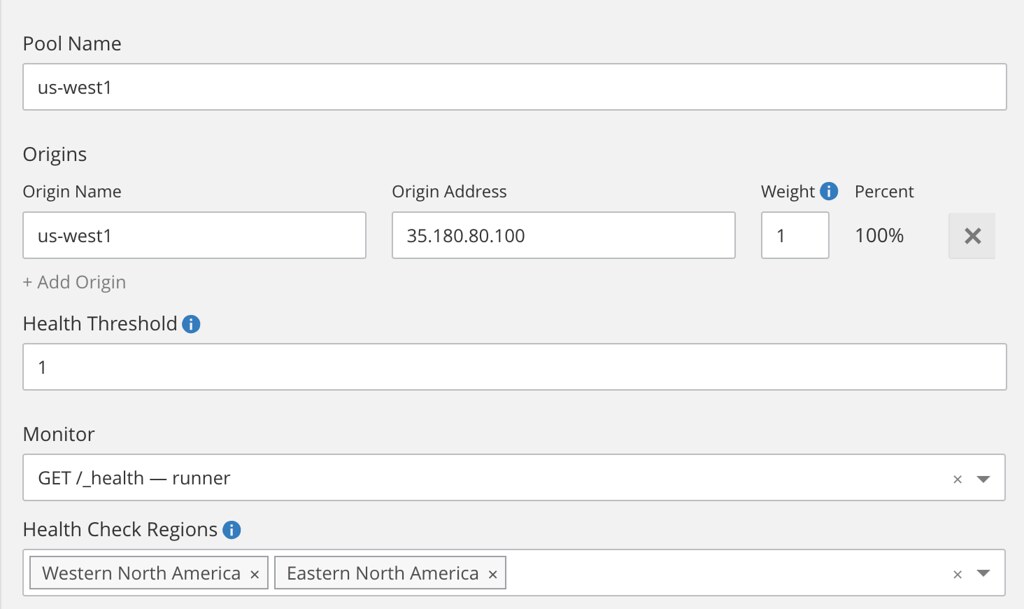
Once activated, create a two pools (one per region using the static IP we just created):
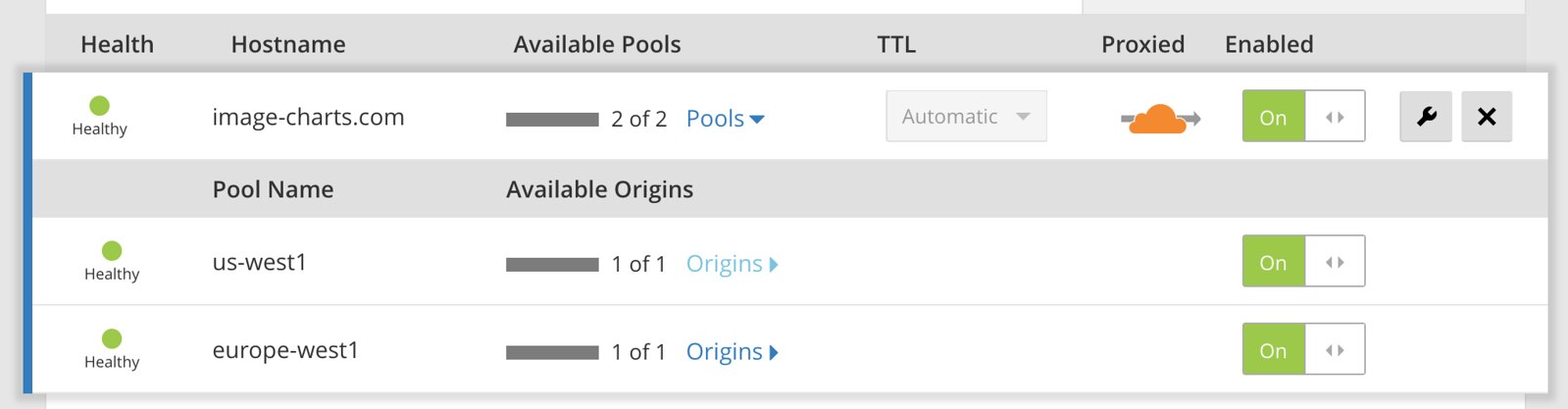
... then create a monitor and finally the load-balancer that distribute load based on the visitor geolocation.