
12/06/2020

How to upload Shopify PDF invoices to Google Drive with Zapier

Yesterday I discovered that my fiancée was manually downloading every invoice (generated with Order Printer Pro app) from Shopify so then she could upload them to her Google Drive "invoices" folder. It's more than a hundred manual operations per month and that number is growing. FAST.

Let's automate that with Zapier 😇.

Step 1: Trigger Zap on new Shopify paid order

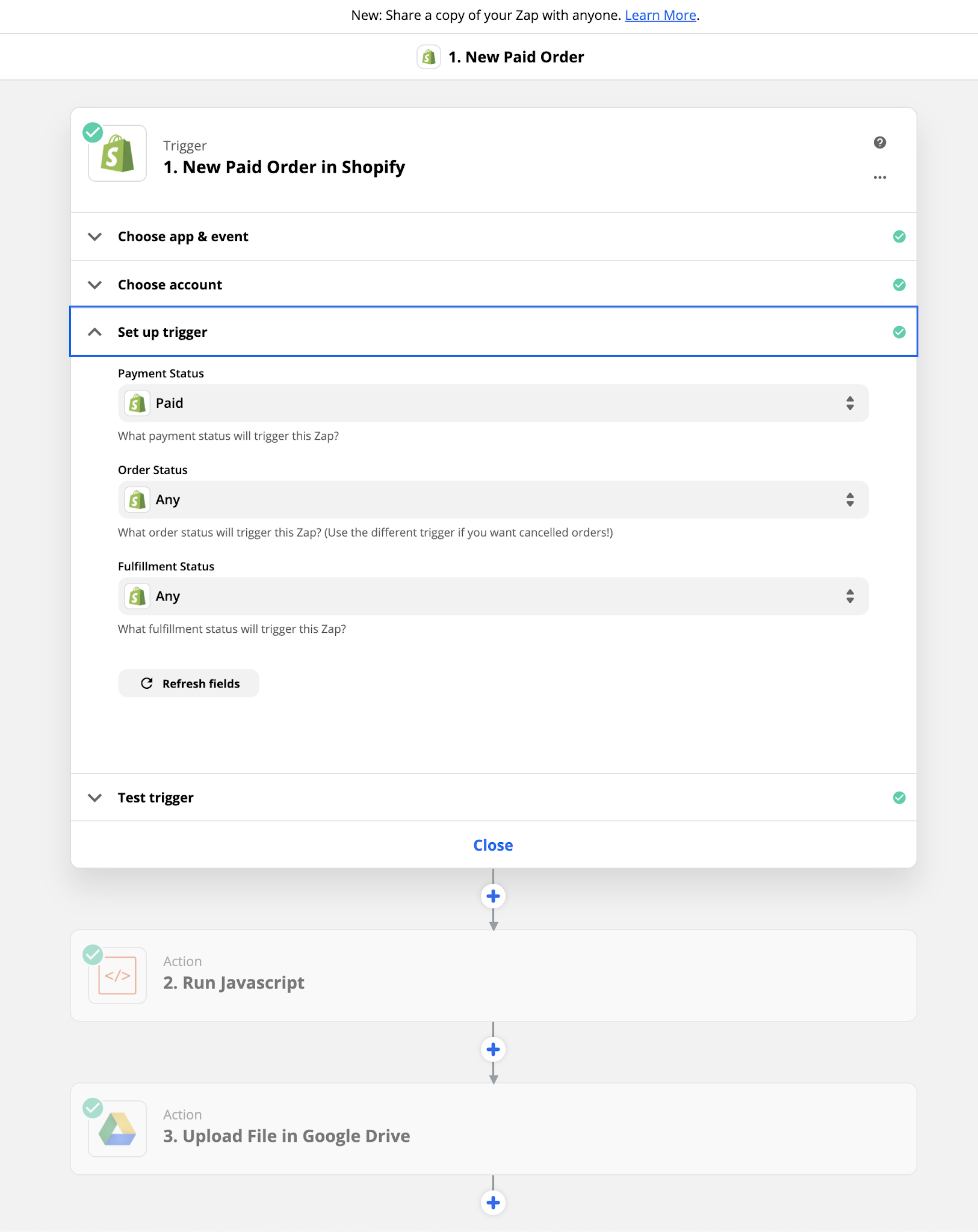
First thing first, create a new zap with a Shopify trigger "New Paid Order".
Step 2: Add some glue code

Sadly the Shopify connector does not expose metadata from apps like Order Printer Pro. We won't get the pdf invoice link for free. Hopefully we can download the receipt page html source code and extract the "Download Invoice" link from there.

Add a "Code by Zapier" step along in order to run JavaScript code. Setup the 3 inputs variables below:
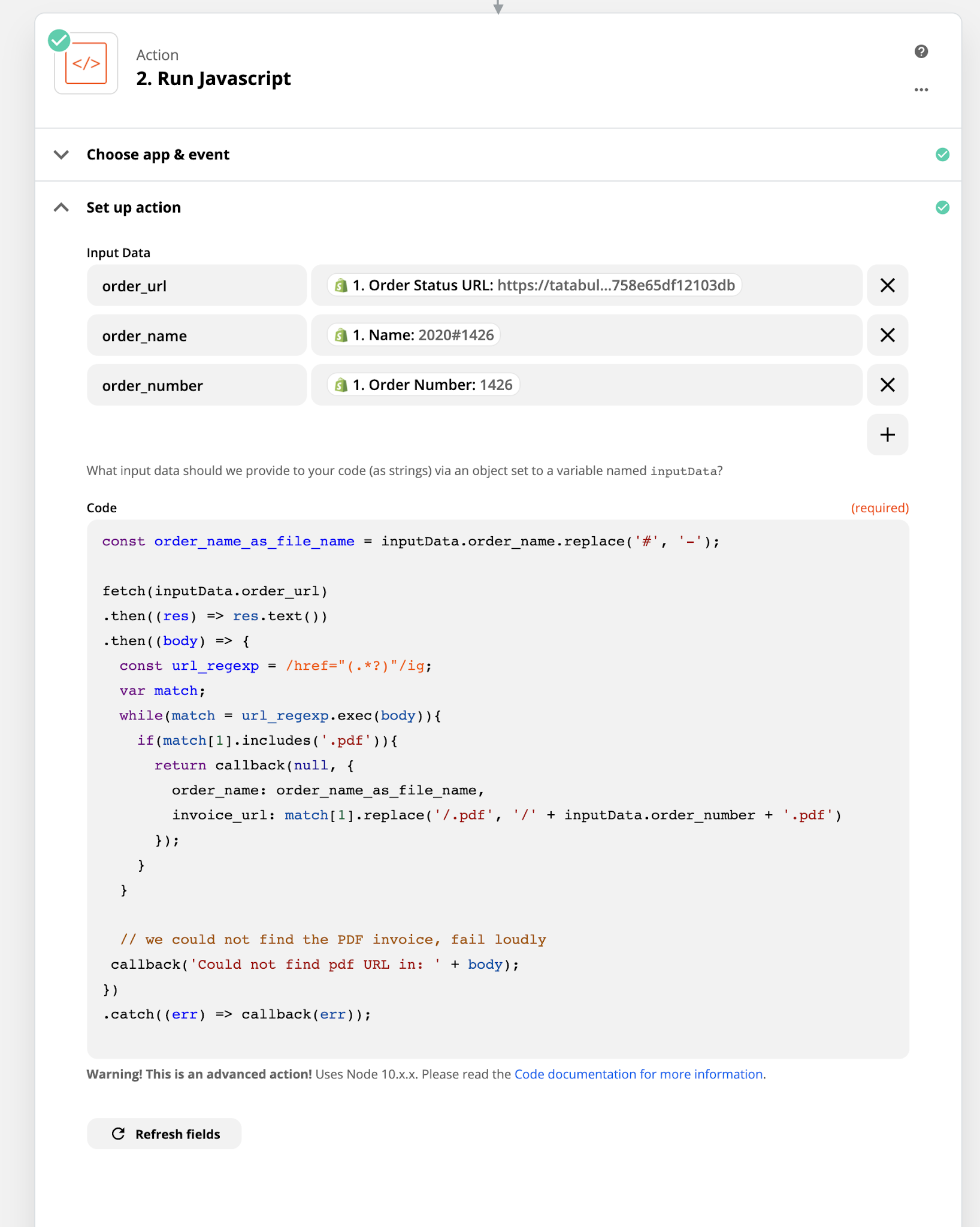
Copy/paste the -good-enough- code below:

const order_name_as_file_name = inputData.order_name.replace('#', '-');

fetch(inputData.order_url)
.then((res) => res.text())
.then((body) => {
  const url_regexp = /href="(.*?)"/ig;
  let match;
  while(match = url_regexp.exec(body)){
    if(match[1].includes('.pdf')){
      return callback(null, {
        order_name: order_name_as_file_name, 
        invoice_url: match[1].replace('/.pdf', `/${inputData.order_number}.pdf`)
      });
    }
  }
  
  // we could not find the PDF invoice, fail loudly
 callback(`Could not find pdf URL in: ${body}`);
})
.catch((err) => callback(err));

Step 3: Upload PDF Invoice to Google Drive

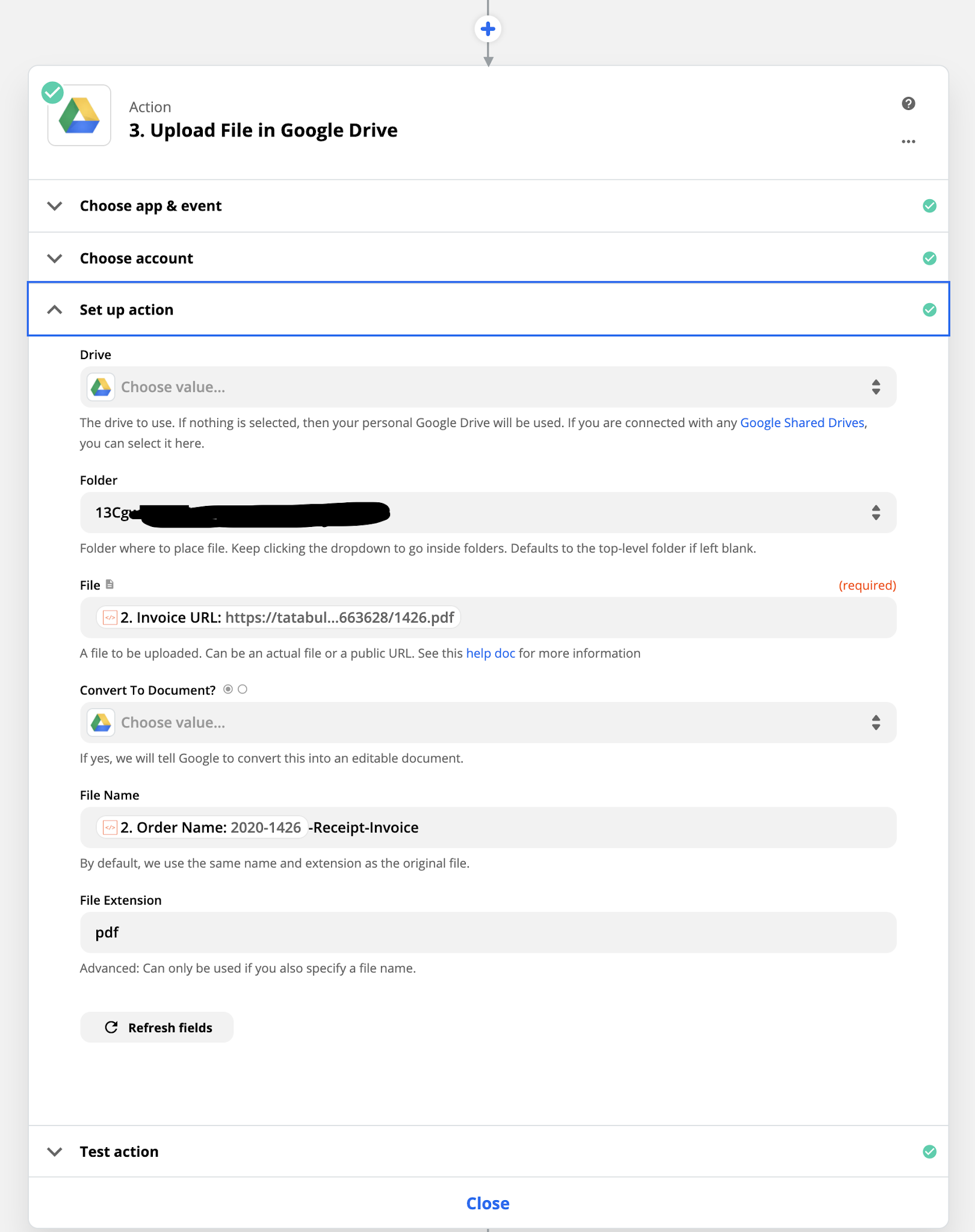
One last thing, add a "Upload File in Google Drive" action, select your drive and folder. Select the "Invoice URL" we got from our previous step as the file parameter, customize the filename as needed and you are good to go!
Job done, you now get full tracability and alerting capabilities from Zapier, enjoy!

11/20/2020

How to fix "there is no timer running, must be called from the context of Tokio runtime"

Some context

You just tried to compile your Rust project and got the there is no timer running, must be called from the context of Tokio runtime error?

You are desesperatly trying to understand what is going on?

So did I!

For future reference, my project relied on tokio v0.3. I added a dependency (bollard) that was relying on tokio v0.2.

Even when my code was in the execution context of a tokio runtime (v0.3) calling bollard code triggered at runtime the there is no timer running, must be called from the context of Tokio runtime error.

How do I fix this?

Option 1: start a new runtime in tokio v0.2

Your first option would be to start another runtime in the same tokio version that your dependency requires, something like:

use tokio::runtime::Runtime;

// Create the runtime
let rt = Runtime::new().unwrap();

// Spawn a future onto the runtime
rt.block_on(async {
    // call your dependency
});

That would result in two threadpools so it might be an issue in some case. I did not go down this path

Option 2: use the same version that your dependency

It's the easiest option. Downgrade your tokio project dependency to v0.2 so it can be the same as your dependency. But yep, it sucks.

Option 3: send a patch to the dependency

Last option (and the best one) is to create and send a patch to your dependency project to upgrade its tokio version.

11/02/2020

How PostgreSQL triggers works when called with a PostgREST PATCH HTTP request

Wonder what values are set or not inside your new.column_name and old.column_name when you are calling PostgREST with a PATCH request? This article is for you!

Create a private schema for our sample app, we will expose the public schema for our PostgREST API:

create schema private;

A city table:

create table private.city (
    city__id integer not null primary key ,
    name text not null,
    countrycode character(3) not null,
    district text not null,
    population integer not null
);

with some data:

copy private.city (city__id, name, countrycode, district, population) FROM stdin;
1	Kabul	AFG	Kabol	1780000
2	Qandahar	AFG	Qandahar	237500
3	Herat	AFG	Herat	186800
\.

Now let's expose this city private table through PostgREST as a public API (public schema) so we stay clean regarding the Separation of Concerns principle:

create view public.cities as 
	select city__id as id, name, countrycode, district, population 
    from private.city;

Let's add support for the PATCH HTTP verb on our newly created /cities REST endpoint.

create or replace function private.update_city() returns trigger as
$$
begin
    raise exception 'new.name = %, old.name=%, new.countrycode = %, old.countrycode = %', new.name, old.name, new.countrycode, old.countrycode;

    return new;
end;
$$ security definer language plpgsql;


create trigger city_update
    instead of update
    on public.cities
    for each row
execute procedure private.update_city();

Now our function private.update_city() will be called for each rows submitted through PATCH /cities HTTP request. As you can see from update_city function body we print the before/after values of name and countrycode columns in PATCH requests.

What's the value of new.countrycode if I don't specify countrycode property in PATCH request body?

# PATCH /cities?id=eq.1 '{"name": "new_value"}'
curl -H "content-type: application/json" \
	--request PATCH \
    --data '{"name": "new_value"}' http://localhost:3000/cities?id=eq.1 | jq '.message'
new.name = new_value, old.name=Kabul,
new.countrycode = AFG, old.countrycode = AFG
As you can see, the property (column in fact) countrycode was not specified in the PATCH request body but it still defined with its current value in new.countrycode and old.countrycode just like we expected it to be.

What's the value of new.name if I set name as a null value in PATCH request body?

# PATCH /cities?id=eq.1 '{"name": null}'

curl -H "content-type: application/json" \
	--request PATCH \
	--data '{"name": null}' http://localhost:3000/cities?id=eq.1 | jq '.message'
new.name = <NULL>, old.name=Kabul,
new.countrycode = AFG, old.countrycode = AFG

Perfect! Just like we expected. We set name property to null in our PATCH request body thus new.name is set to NULL in our trigger function.

Clone this github repository to try all of this locally. Wonder what SQL conventions you should use? Check out these SQL conventions.

« »
 
 
Made with on a hot august night from an airplane the 19th of March 2017.